냥코대전쟁 웹사이트 만들기
냥코대전쟁 정보 조회 사이트 설명
부산대학교 웹응용프로그래밍 텀프로젝트로 진행한 nextjs 정적 웹사이트 만들기입니다. 냥코대전쟁이라는 모바일 게임 데이터를 이용하여 정보조회 사이트를 만들었습니다. cat페이지 기반으로 설명
프로젝트 기획
- 평소에 냥코대전쟁 게임을 하면서 유틸리티 사이트가 필요하다고 느꼈었고, 수업을 듣는 김에 프로젝트 주제로 선정하기로 했습니다.
- 정식 공개 데이터는 아닙니다만 깃허브에 올라와있는 냥코대전쟁 시뮬레이터 저장소를 통해 데이터를 얻었습니다.
주요 사이트 기능
-
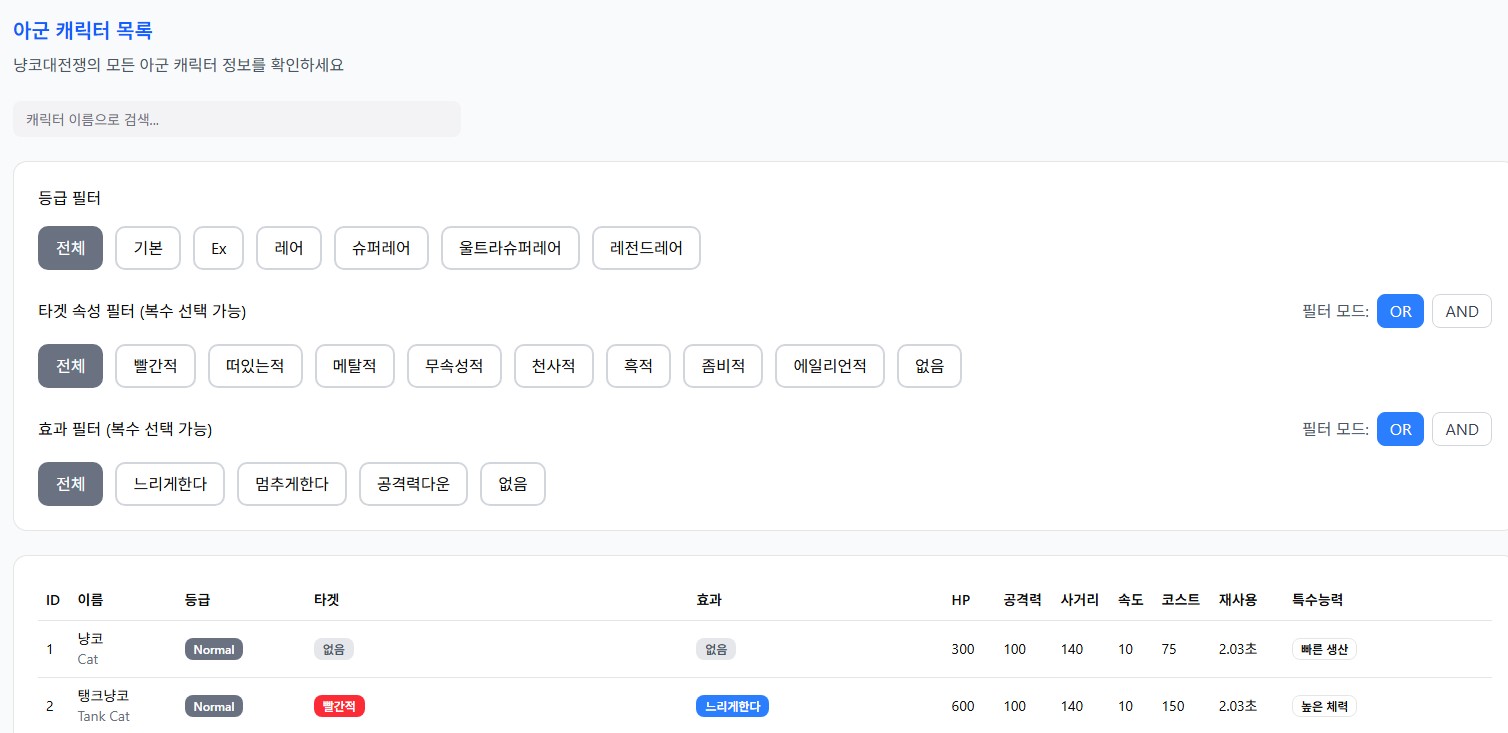
- 아군 캐릭터 목록 조회, 게임 내에서의 검색 방식과 유사하게 만들며 추가적인 필터기능(게임에 없는) 추가
-
- 적 캐릭터 목록 조회, 위와 동일
-
- 스테이지 목록 조회, 주요 스테이지 목록 및 출몰 적 기반으로 검색
-
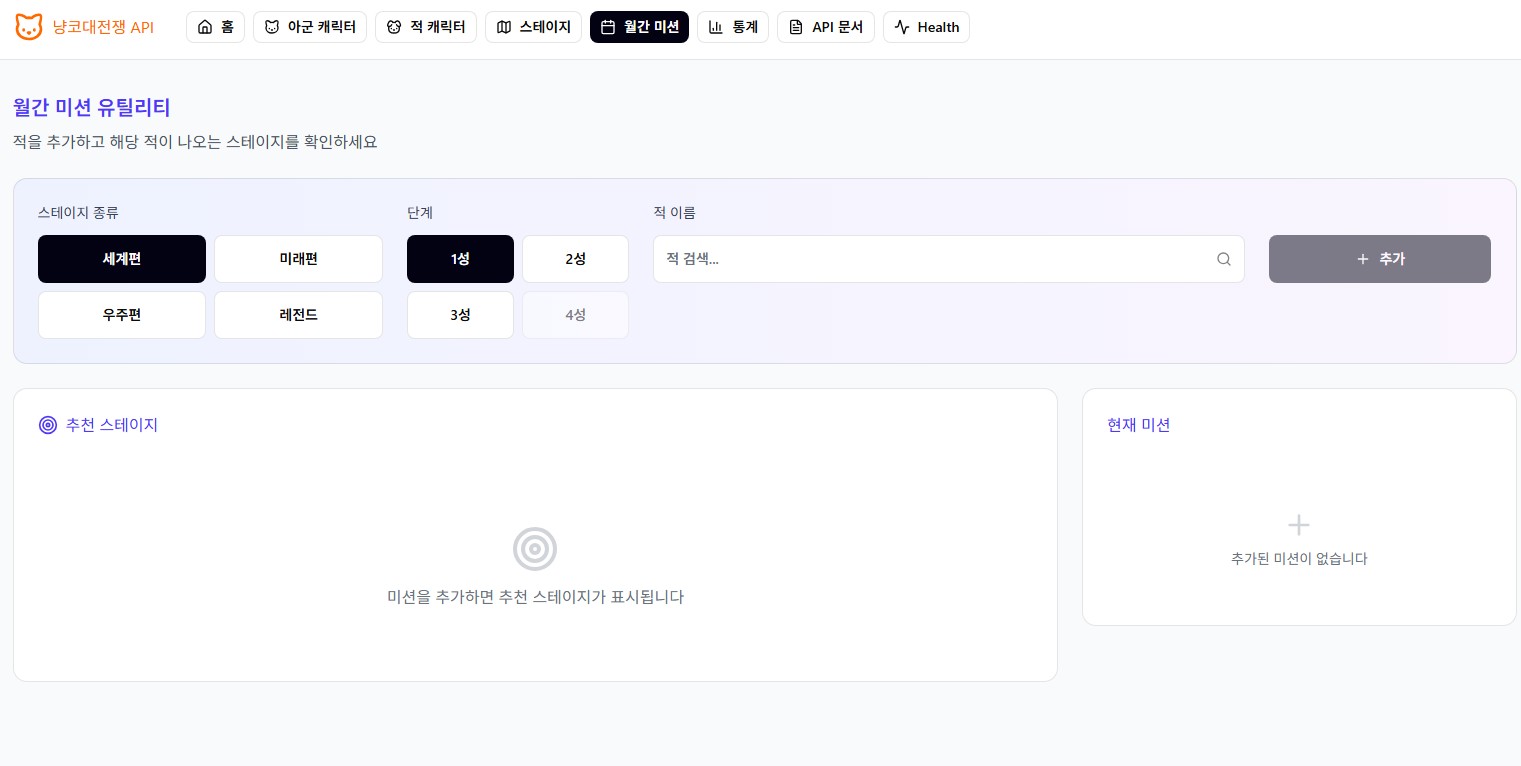
- 월간 미션 도우미 기능, 맵 종류와 잡아야 하는 적 캐릭터를 입력하면 해당 적 캐릭터가 나오는 스테이지를 추천하여 표시
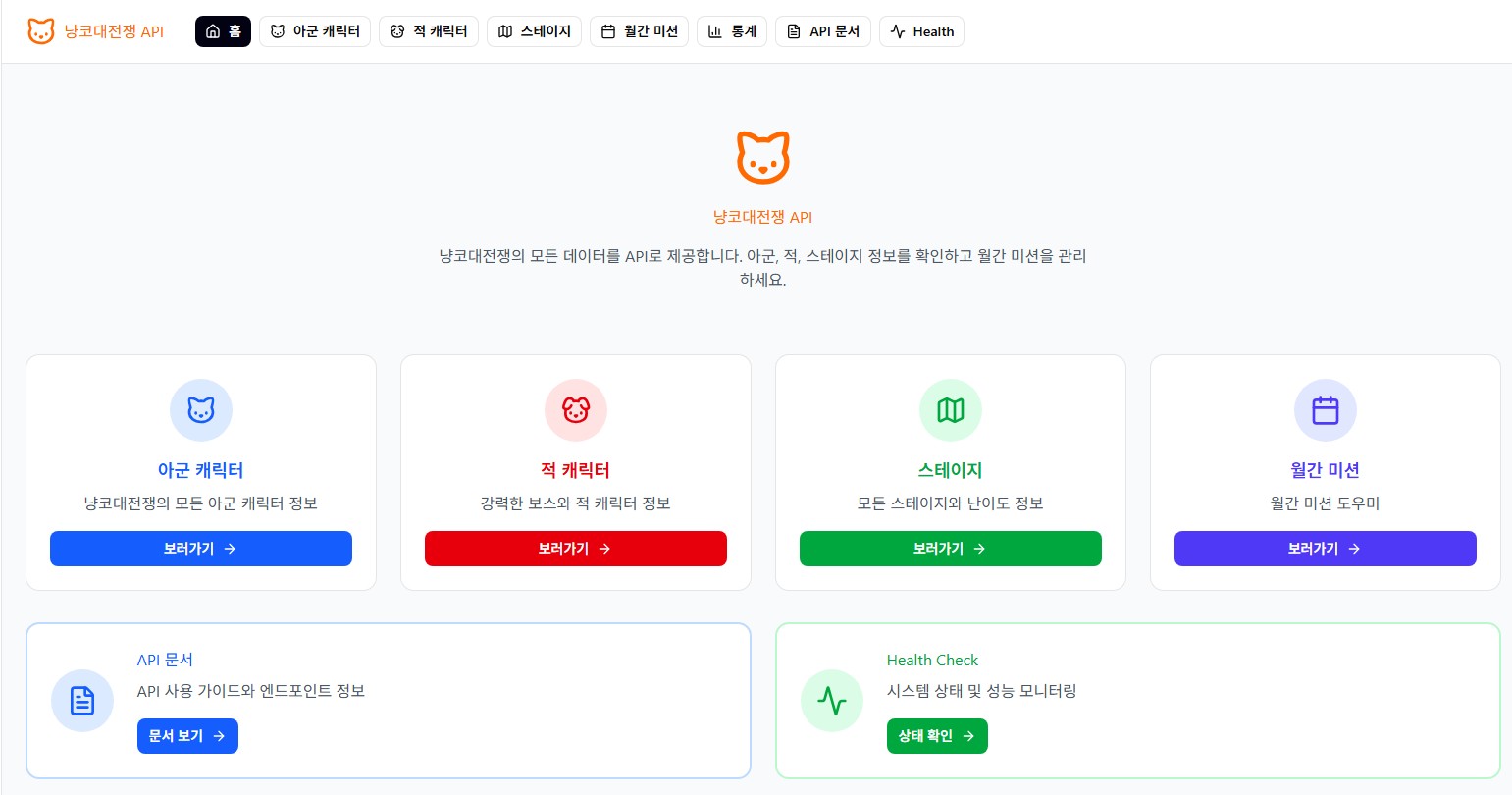
초기 UI 디자인(Figma)
인덱스 페이지
아군 캐릭터 페이지
미션 도우미 페이지
Figma 코드 Nextjs 프로젝트로 이식
Figma가 생성해준 아군 캐릭터 페이지
// import 문...
export function AllyCatsPage() {
// 상태 및 여러가지 유틸 함수
// 페이지
return (
<div className="space-y-6">
<div>
<h2 className="text-blue-600 mb-2">아군 캐릭터 목록</h2>
<p className="text-gray-600">냥코대전쟁의 모든 아군 캐릭터 정보를 확인하세요</p>
</div>
<Input
type="text"
placeholder="캐릭터 이름으로 검색..."
value={searchTerm}
onChange={(e) => setSearchTerm(e.target.value)}
className="max-w-md"
/>
{/* Filters */}
<Card className="p-6">
<div className="space-y-6">
<div>
<h3 className="mb-4">등급 필터</h3>
<div className="flex flex-wrap gap-3">
{rarities.map((rarity) => (
<button
key={rarity.value}
onClick={() => setSelectedRarity(rarity.value)}
className={`px-4 py-2 rounded-lg border-2 transition-all ${getColorClasses(
rarity.color,
selectedRarity === rarity.value
)}`}
>
{rarity.label}
</button>
))}
</div>
</div>
<div>
<div className="flex items-center justify-between mb-4">
<h3>타겟 속성 필터 (복수 선택 가능)</h3>
<div className="flex gap-2 items-center">
<span className="text-gray-600">필터 모드:</span>
<button
onClick={() => setTargetFilterMode('OR')}
className={`px-3 py-1 rounded-md border transition-all ${
targetFilterMode === 'OR'
? 'bg-blue-500 text-white border-blue-500'
: 'bg-white text-gray-700 border-gray-300 hover:bg-blue-50'
}`}
>
OR
</button>
<button
onClick={() => setTargetFilterMode('AND')}
className={`px-3 py-1 rounded-md border transition-all ${
targetFilterMode === 'AND'
? 'bg-blue-500 text-white border-blue-500'
: 'bg-white text-gray-700 border-gray-300 hover:bg-blue-50'
}`}
>
AND
</button>
</div>
</div>
<div className="flex flex-wrap gap-3">
{targets.map((target) => (
<button
key={target.value}
onClick={() => handleTargetToggle(target.value)}
className={`px-4 py-2 rounded-lg border-2 transition-all ${getColorClasses(
target.color,
selectedTargets.includes(target.value)
)}`}
>
{target.label}
</button>
))}
</div>
{selectedTargets.length > 1 && !selectedTargets.includes('all') && (
<p className="text-gray-600 mt-2">
{targetFilterMode === 'OR'
? '선택한 속성 중 하나라도 가진 캐릭터를 표시합니다'
: '선택한 모든 속성을 가진 캐릭터만 표시합니다'}
</p>
)}
</div>
<div>
<div className="flex items-center justify-between mb-4">
<h3>효과 필터 (복수 선택 가능)</h3>
<div className="flex gap-2 items-center">
<span className="text-gray-600">필터 모드:</span>
<button
onClick={() => setEffectFilterMode('OR')}
className={`px-3 py-1 rounded-md border transition-all ${
effectFilterMode === 'OR'
? 'bg-blue-500 text-white border-blue-500'
: 'bg-white text-gray-700 border-gray-300 hover:bg-blue-50'
}`}
>
OR
</button>
<button
onClick={() => setEffectFilterMode('AND')}
className={`px-3 py-1 rounded-md border transition-all ${
effectFilterMode === 'AND'
? 'bg-blue-500 text-white border-blue-500'
: 'bg-white text-gray-700 border-gray-300 hover:bg-blue-50'
}`}
>
AND
</button>
</div>
</div>
<div className="flex flex-wrap gap-3">
{effects.map((effect) => (
<button
key={effect.value}
onClick={() => handleEffectToggle(effect.value)}
className={`px-4 py-2 rounded-lg border-2 transition-all ${getColorClasses(
effect.color,
selectedEffects.includes(effect.value)
)}`}
>
{effect.label}
</button>
))}
</div>
{selectedEffects.length > 1 && !selectedEffects.includes('all') && (
<p className="text-gray-600 mt-2">
{effectFilterMode === 'OR'
? '선택한 효과 중 하나라도 가진 캐릭터를 표시합니다'
: '선택한 모든 효과를 가진 캐릭터만 표시합니다'}
</p>
)}
</div>
</div>
</Card>
<Card className="p-6">
<div className="overflow-x-auto">
<Table>
<TableHeader>
<TableRow>
<TableHead>ID</TableHead>
<TableHead>이름</TableHead>
<TableHead>등급</TableHead>
<TableHead>타겟</TableHead>
<TableHead>효과</TableHead>
<TableHead>HP</TableHead>
<TableHead>공격력</TableHead>
<TableHead>사거리</TableHead>
<TableHead>속도</TableHead>
<TableHead>코스트</TableHead>
<TableHead>재사용</TableHead>
<TableHead>특수능력</TableHead>
</TableRow>
</TableHeader>
<TableBody>
{filteredCats.length === 0 ? (
<TableRow>
<TableCell colSpan={12} className="text-center text-gray-500 py-8">
검색 결과가 없습니다
</TableCell>
</TableRow>
) : (
filteredCats.map((cat) => (
<TableRow
key={cat.id}
className="cursor-pointer hover:bg-gray-50 transition-colors"
onClick={() => {
setSelectedCat(cat);
setCurrentLevel(30);
setIsDialogOpen(true);
}}
>
<TableCell>{cat.id}</TableCell>
<TableCell>
<div>
<div>{cat.nameKo}</div>
<div className="text-gray-500">{cat.name}</div>
</div>
</TableCell>
<TableCell>
<Badge className={getRarityColor(cat.rarity)}>{cat.rarity}</Badge>
</TableCell>
<TableCell>
<div className="flex flex-wrap gap-1">
{(cat.targetAttributes || ['없음']).map((target, idx) => (
<Badge key={idx} className={getTargetColor(target)}>
{target}
</Badge>
))}
</div>
</TableCell>
<TableCell>
<div className="flex flex-wrap gap-1">
{(cat.effects || ['없음']).map((effect, idx) => (
<Badge key={idx} className={getEffectColor(effect)}>
{effect}
</Badge>
))}
</div>
</TableCell>
<TableCell>{cat.hp.toLocaleString()}</TableCell>
<TableCell>{cat.attack.toLocaleString()}</TableCell>
<TableCell>{cat.range}</TableCell>
<TableCell>{cat.speed}</TableCell>
<TableCell>{cat.cost}</TableCell>
<TableCell>{cat.recharge}초</TableCell>
<TableCell>
<div className="flex flex-wrap gap-1">
{cat.abilities.map((ability, idx) => (
<Badge key={idx} variant="outline" className="text-xs">
{ability}
</Badge>
))}
</div>
</TableCell>
</TableRow>
))
)}
</TableBody>
</Table>
</div>
</Card>
<Card className="p-4 bg-blue-50">
<p className="text-blue-800">
<span className="font-medium">API 엔드포인트:</span> GET /api/cats/allies?rarity={selectedRarity}&targets={selectedTargets.join(',')}&targetMode={targetFilterMode}&effects={selectedEffects.join(',')}&effectMode={effectFilterMode}
</p>
<p className="text-blue-600 mt-2">총 {filteredCats.length}개의 캐릭터</p>
</Card>
{/* Character Detail Dialog */}
<Dialog open={isDialogOpen} onOpenChange={setIsDialogOpen}>
<DialogContent className="max-w-2xl max-h-[90vh] overflow-y-auto">
{selectedCat && (() => {
const baseLevel = selectedCat.baseLevel || 1;
const levelDiff = currentLevel - baseLevel;
const calculatedHP = selectedCat.hp + (levelDiff * (selectedCat.hpPerLevel || 0));
const calculatedAttack = selectedCat.attack + (levelDiff * (selectedCat.attackPerLevel || 0));
return (
<>
<DialogHeader>
<div className="flex items-center justify-between">
<div>
<DialogTitle className="text-blue-600">
{selectedCat.nameKo} ({selectedCat.name})
</DialogTitle>
<DialogDescription>
캐릭터 상세 정보
</DialogDescription>
</div>
{/* Level Control */}
<div className="flex items-center gap-2">
<span className="text-gray-600 text-sm">레벨</span>
<button
onClick={() => setCurrentLevel(Math.max(1, currentLevel - 10))}
className="w-10 h-8 rounded bg-white border-2 border-blue-400 text-blue-400 hover:bg-blue-400 hover:text-white transition-colors flex items-center justify-center text-xs"
>
-10
</button>
<button
onClick={() => setCurrentLevel(Math.max(1, currentLevel - 1))}
className="w-8 h-8 rounded-full bg-white border-2 border-blue-500 text-blue-500 hover:bg-blue-500 hover:text-white transition-colors flex items-center justify-center"
>
-
</button>
<Input
type="number"
min="1"
max="999"
value={currentLevel}
onChange={(e) => {
const value = parseInt(e.target.value);
if (!isNaN(value)) {
setCurrentLevel(Math.max(1, Math.min(999, value)));
}
}}
className="w-16 h-8 text-center px-2"
/>
<button
onClick={() => setCurrentLevel(Math.min(999, currentLevel + 1))}
className="w-8 h-8 rounded-full bg-white border-2 border-blue-500 text-blue-500 hover:bg-blue-500 hover:text-white transition-colors flex items-center justify-center"
>
+
</button>
<button
onClick={() => setCurrentLevel(Math.min(999, currentLevel + 10))}
className="w-10 h-8 rounded bg-white border-2 border-blue-400 text-blue-400 hover:bg-blue-400 hover:text-white transition-colors flex items-center justify-center text-xs"
>
+10
</button>
</div>
</div>
</DialogHeader>
<div className="space-y-6 mt-4">
{/* Basic Info */}
<div className="grid grid-cols-2 gap-4">
<div>
<p className="text-gray-600 mb-1">ID</p>
<p>{selectedCat.id}</p>
</div>
<div>
<p className="text-gray-600 mb-1">등급</p>
<Badge className={getRarityColor(selectedCat.rarity)}>
{selectedCat.rarity}
</Badge>
</div>
</div>
{/* Target Attributes */}
<div>
<p className="text-gray-600 mb-2">타겟 속성</p>
<div className="flex flex-wrap gap-2">
{(selectedCat.targetAttributes || ['없음']).map((target, idx) => (
<Badge key={idx} className={getTargetColor(target)}>
{target}
</Badge>
))}
</div>
</div>
{/* Effects */}
<div>
<p className="text-gray-600 mb-2">효과</p>
<div className="flex flex-wrap gap-2">
{(selectedCat.effects || ['없음']).map((effect, idx) => (
<Badge key={idx} className={getEffectColor(effect)}>
{effect}
</Badge>
))}
</div>
</div>
{/* Stats */}
<div className="border-t pt-4">
<h4 className="mb-4">스탯 정보 (레벨 {currentLevel})</h4>
<div className="grid grid-cols-2 gap-4">
<div className="bg-gray-50 p-3 rounded-lg">
<p className="text-gray-600">HP</p>
<p className="text-red-600">{Math.round(calculatedHP).toLocaleString()}</p>
</div>
<div className="bg-gray-50 p-3 rounded-lg">
<p className="text-gray-600">공격력</p>
<p className="text-orange-600">{Math.round(calculatedAttack).toLocaleString()}</p>
</div>
<div className="bg-gray-50 p-3 rounded-lg">
<p className="text-gray-600">사거리</p>
<p className="text-blue-600">{selectedCat.range}</p>
</div>
<div className="bg-gray-50 p-3 rounded-lg">
<p className="text-gray-600">속도</p>
<p className="text-green-600">{selectedCat.speed}</p>
</div>
<div className="bg-gray-50 p-3 rounded-lg">
<p className="text-gray-600">코스트</p>
<p className="text-yellow-600">{selectedCat.cost}</p>
</div>
<div className="bg-gray-50 p-3 rounded-lg">
<p className="text-gray-600">재사용 시간</p>
<p className="text-purple-600">{selectedCat.recharge}초</p>
</div>
</div>
</div>
{/* Abilities */}
<div className="border-t pt-4">
<h4 className="mb-3">특수능력</h4>
<div className="flex flex-wrap gap-2">
{selectedCat.abilities.map((ability, idx) => (
<Badge key={idx} variant="outline" className="px-3 py-1">
{ability}
</Badge>
))}
</div>
</div>
</div>
</>
);
})()}
</DialogContent>
</Dialog>
</div>
);
}컴포넌트 분리(props와 return문 일부)
// props, 여러가지 옵션들
    const FILTER_RARITY_OPTIONS = [
    { value: "all", label: "전체", color: "gray" as const },
    { value: "기본", label: "기본", color: "red" as const },
    { value: "Ex", label: "Ex", color: "orange" as const },
    { value: "레어", label: "레어", color: "yellow" as const },
    { value: "슈퍼레어", label: "슈퍼레어", color: "green" as const },
    { value: "울트라슈퍼레어", label: "울트라슈퍼레어", color: "blue" as const },
    { value: "레전드레어", label: "레전드레어", color: "purple" as const },
    ];

    const FILTER_TARGET_OPTIONS = [
    { value: "all", label: "전체", color: "gray" as const },
    { value: "None", label: "없음", color: "gray" as const },
    { value: "Red", label: "빨간적", color: "red" as const },
    { value: "Floating", label: "떠있는적", color: "green" as const },
    { value: "Black", label: "검은적", color: "black" as const },
    { value: "Metal", label: "메탈적", color: "slate" as const },
    { value: "Angel", label: "천사", color: "yellow" as const },
    { value: "Alien", label: "에이리언", color: "sky" as const },
    { value: "Zombie", label: "좀비", color: "purple" as const },
    { value: "Relic", label: "고대종", color: "emerald" as const },
    { value: "Demon", label: "악마", color: "blue-900" as const },
    { value: "White", label: "무속성", color: "stone" as const },
    ];

    const FILTER_EFFECT_OPTIONS = [
    { group: "1", value: "all", label: "전체" },
    { group: "1", value: "None", label: "없음" },
    { group: "1", value: "Slow", label: "느리게 한다" },
    { group: "1", value: "Stop", label: "멈춘다" },
    { group: "1", value: "Knockback", label: "날려버린다" },
    { group: "1", value: "Weak", label: "공격력 다운" },
    { group: "2", value: "MassiveDamage", label: "초 데미지" },
    { group: "2", value: "InsaneDamage", label: "극 데미지" },
    { group: "2", value: "Good", label: "엄청 강하다" },
    { group: "2", value: "Resistant", label: "맷집 좋다" },
    { group: "2", value: "InsanelyTough", label: "초 맷집" },
    { group: "2", value: "Curse", label: "저주" },
    { group: "2", value: "ImuATK", label: "공격 무효" },
    { group: "2", value: "Only", label: "타겟 한정" },
    ];

    const FILTER_ABILITY_OPTIONS = [
    { group: "1", value: "all", label: "전체" },
    { group: "1", value: "None", label: "없음" },
    { group: "1", value: "AtkUp", label: "공격력 업" },
    { group: "1", value: "LETHAL", label: "살아남는다" },
    { group: "1", value: "BaseDestroyer", label: "성 파괴가 특기" },
    { group: "1", value: "Critical", label: "크리티컬" },
    { group: "1", value: "StrickAttack", label: "혼신의 일격" },
    { group: "1", value: "Bounty", label: "격파시 머니 up" },
    { group: "1", value: "WaveBlocker", label: "파동삭제" },
    { group: "1", value: "Metallic", label: "메탈" },
    { group: "2", value: "BarrierBreak", label: "베리어 브레이커" },
    { group: "2", value: "ShieldBreak", label: "쉴드 브레이커" },
    { group: "2", value: "MiniWave", label: "소파동" },
    { group: "2", value: "Wave", label: "파동 공격" },
    { group: "2", value: "MiniVolcano", label: "소열파" },
    { group: "2", value: "Volcano", label: "열파 공격" },
    { group: "2", value: "Blast", label: "폭파 공격" },
    { group: "2", value: "WaveBlocker", label: "파동스토퍼" },
    { group: "2", value: "VolcanoCounter", label: "열파 카운터" },
    { group: "2", value: "Summon", label: "소환" },
    { group: "4", value: "ColosusSlayer", label: "초생명체 특효" },
    { group: "4", value: "BehemothSlayer", label: "초수 특효" },
    { group: "4", value: "SageHunter", label: "초현자 특효" },
    { group: "4", value: "MetalKiller", label: "메탈 킬러" },
    { group: "4", value: "ZombieKiller", label: "좀비 킬러" },
    { group: "4", value: "SoulStrike", label: "영혼 공격" },
    { group: "4", value: "EKILL", label: "사도킬러" },
    { group: "4", value: "WKILL", label: "마녀킬러" },

    { group: "5", value: "ImuWeak", label: "공격력 다운 무효" },
    { group: "5", value: "ImuKB", label: "날려버린다 무효" },
    { group: "5", value: "ImuStop", label: "움직임을 멈춘다 무효" },
    { group: "5", value: "ImuSlow", label: "움직임을 느리게 한다 무효" },
    { group: "5", value: "ImuWarp", label: "워프 무효" },
    { group: "5", value: "ImuCurse", label: "고대의 저주 무효" },
    { group: "5", value: "ImuPoison", label: "독 데미지 무효" },
    { group: "5", value: "ImuWave", label: "파동 데미지 무효" },
    { group: "5", value: "ImuVolcano", label: "열파 데미지 무효" },
    { group: "5", value: "ImuBlast", label: "폭파 데미지 무효" },
    { group: "6", value: "weaken_resist", label: "공격력 다운 저항" },
    { group: "6", value: "stop_resist", label: "움직임을 멈춘다 저항" },
    { group: "6", value: "slow_resist", label: "움직임을 느리게 한다 저항" },
    { group: "6", value: "knockback_resist", label: "날려버린다 저항" },
    { group: "6", value: "wave_resist", label: "파동 데미지 저항" },
    { group: "6", value: "mini_wave_resist", label: "열파 데미지 저항" },
    { group: "6", value: "warp_resist", label: "워프 저항" },
    { group: "6", value: "curse_resist", label: "고대의 저주 저항" },
    { group: "6", value: "poison_resist", label: "독 데미지 저항" },
    { group: "7", value: "hp_up", label: "기본 체력 업" },
    { group: "7", value: "atk_base_up", label: "기본 공격력 업" },
    { group: "7", value: "speed_up", label: "이동 속도 업" },
    { group: "7", value: "knockback_up", label: "넉백 횟수 증가" },
    { group: "7", value: "cost_down", label: "생산 코스트 할인" },
    { group: "7", value: "production_up", label: "생산 스피드 업" },
    { group: "7", value: "tba_down", label: "공격 간격 단축" },
    ];

    const FILTER_ATTACKTYPE_OPTIONS = [
    { value: "all", label: "전체", color: "gray" as const },
    { value: "single", label: "단일 공격", color: "blue" as const },
    { value: "range", label: "범위 공격", color: "green" as const },
    { value: "long", label: "원거리 공격", color: "purple" as const },
    { value: "omni", label: "전방위 공격", color: "red" as const },
    ];

    return (
        <div className="space-y-6">
        <UnifiedFiltersPanel
            searchTerm={searchTerm}
            setSearchTerm={setSearchTerm}
            rarities={FILTER_RARITY_OPTIONS}
            selectedRarity={selectedRarity}
            setSelectedRarity={setSelectedRarity}
            targets={FILTER_TARGET_OPTIONS}
            selectedTargets={selectedTargets}
            setSelectedTargets={setSelectedTargets}
            targetFilterMode={targetFilterMode}
            setTargetFilterMode={setTargetFilterMode}
            effects={FILTER_EFFECT_OPTIONS}
            selectedEffects={selectedEffects}
            setSelectedEffects={setSelectedEffects}
            effectFilterMode={effectFilterMode}
            setEffectFilterMode={setEffectFilterMode}
            abilities={FILTER_ABILITY_OPTIONS}
            selectedAbilities={selectedAbilities}
            setSelectedAbilities={setSelectedAbilities}
            abilityFilterMode={abilityFilterMode}
            setAbilityFilterMode={setAbilityFilterMode}
            attackTypes={FILTER_ATTACKTYPE_OPTIONS}
            selectedAttackTypes={selectedAttackTypes}
            setSelectedAttackTypes={setSelectedAttackTypes}
            attackTypeFilterMode={attackTypeFilterMode}
            setAttackTypeFilterMode={setAttackTypeFilterMode}
            toggleMulti={toggleMulti}
        />

        <CatsTable
            cats={filteredCats}
            onSelect={handleCatSelect}
            getRarityColor={getRarityColor}
            getTargetColor={getTargetColor}
            getEffectColor={getEffectColor}
        />

        <CatDetailDialog
            isOpen={isDialogOpen}
            onOpenChange={setIsDialogOpen}
            selectedCat={selectedCat}
            currentLevel={currentLevel}
            setCurrentLevel={setCurrentLevel}
        />
        </div>
);// 필터 컴포넌트(적 캐릭터 페이지에서도 사용)
"use client";
import { Input } from "@/components/ui/input";
import Card from "@/components/ui/card";
import GenericFilter from "@/components/common/GenericFilter";
interface FilterOption {
value: string;
label: string;
color?: string;
}
interface FilterGroupOption {
group: string;
value: string;
label: string;
color?: string;
}
interface UnifiedFiltersPanelProps {
searchTerm: string;
setSearchTerm: (v: string) => void;
rarities?: FilterOption[];
selectedRarity?: string[];
setSelectedRarity?: React.Dispatch<React.SetStateAction<string[]>>;
attributes?: FilterOption[];
selectedAttributes?: string[];
setSelectedAttributes?: React.Dispatch<React.SetStateAction<string[]>>;
targets?: FilterOption[];
selectedTargets?: string[];
setSelectedTargets?: React.Dispatch<React.SetStateAction<string[]>>;
targetFilterMode?: "OR" | "AND";
setTargetFilterMode?: (v: "OR" | "AND") => void;
attributeFilterMode?: "OR" | "AND";
setAttributeFilterMode?: (v: "OR" | "AND") => void;
effects?: FilterGroupOption[];
selectedEffects?: string[];
setSelectedEffects?: React.Dispatch<React.SetStateAction<string[]>>;
effectFilterMode?: "OR" | "AND";
setEffectFilterMode?: (v: "OR" | "AND") => void;
abilities?: FilterGroupOption[];
selectedAbilities?: string[];
setSelectedAbilities?: React.Dispatch<React.SetStateAction<string[]>>;
abilityFilterMode?: "OR" | "AND";
setAbilityFilterMode?: (v: "OR" | "AND") => void;
attackTypes?: FilterOption[];
selectedAttackTypes?: string[];
setSelectedAttackTypes?: React.Dispatch<React.SetStateAction<string[]>>;
attackTypeFilterMode?: "OR" | "AND";
setAttackTypeFilterMode?: (v: "OR" | "AND") => void;
// getColorClasses is no longer required; GenericFilter uses library defaults
toggleMulti: (value: string, setter: React.Dispatch<React.SetStateAction<string[]>>) => void;
}
export default function UnifiedFiltersPanel({
searchTerm,
setSearchTerm,
rarities,
selectedRarity,
setSelectedRarity,
attributes,
selectedAttributes,
setSelectedAttributes,
targets,
selectedTargets,
setSelectedTargets,
targetFilterMode = "OR",
setTargetFilterMode,
attributeFilterMode = "OR",
setAttributeFilterMode,
effects,
selectedEffects,
setSelectedEffects,
effectFilterMode = "OR",
setEffectFilterMode,
abilities,
selectedAbilities,
setSelectedAbilities,
abilityFilterMode = "OR",
setAbilityFilterMode,
attackTypes,
selectedAttackTypes,
setSelectedAttackTypes,
attackTypeFilterMode = "OR",
setAttackTypeFilterMode,
toggleMulti,
}: UnifiedFiltersPanelProps) {
return (
<>
<Input
type="text"
placeholder="검색..."
value={searchTerm}
onChange={(e) => setSearchTerm(e.target.value)}
className="max-w-md"
/>
<Card className="p-6">
<div className="w-full space-y-6">
{/* Rarity Filter (Cat only) now uses GenericFilter */}
{rarities && selectedRarity && setSelectedRarity && (
<GenericFilter
title="등급 필터"
options={rarities}
selected={selectedRarity}
onSelect={(value) => toggleMulti(value, setSelectedRarity)}
/>
)}
{/* Attributes / Targets / AttackTypes / Abilities / Effects handled by generic filter */}
{attributes && selectedAttributes && setSelectedAttributes && (
<GenericFilter
title="속성 필터"
options={attributes}
selected={selectedAttributes}
onSelect={(value) => toggleMulti(value, setSelectedAttributes)}
filterMode={attributeFilterMode}
onModeChange={setAttributeFilterMode}
/>
)}
{targets && selectedTargets && setSelectedTargets && (
<GenericFilter
title="타겟 필터"
options={targets}
selected={selectedTargets}
onSelect={(value) => toggleMulti(value, setSelectedTargets)}
filterMode={targetFilterMode}
onModeChange={setTargetFilterMode}
/>
)}
{effects && selectedEffects && setSelectedEffects && (
<GenericFilter
title="효과 필터"
options={effects}
selected={selectedEffects}
onSelect={(value) => toggleMulti(value, setSelectedEffects)}
filterMode={effectFilterMode}
onModeChange={setEffectFilterMode}
/>
)}
{attackTypes && selectedAttackTypes && setSelectedAttackTypes && (
<GenericFilter
title="공격 타입 필터"
options={attackTypes}
selected={selectedAttackTypes}
onSelect={(value) => toggleMulti(value, setSelectedAttackTypes)}
filterMode={attackTypeFilterMode}
onModeChange={setAttackTypeFilterMode}
/>
)}
{abilities && selectedAbilities && setSelectedAbilities && (
<GenericFilter
title="능력 필터"
options={abilities}
selected={selectedAbilities}
onSelect={(value) => toggleMulti(value, setSelectedAbilities)}
filterMode={abilityFilterMode}
onModeChange={setAbilityFilterMode}
/>
)}
</div>
</Card>
</>
);
}냥코 대전쟁 데이터 파싱 및 타입 설계
아군 캐릭터 데이터
-
이미지 파일은 https://battlecats-db.com/라는 사이트에서 유닛 id를 통한 이미지 링크가 간편할것 같아 해당 사이트의 이미지 링크를 걸어두는걸로 했습니다
-
유닛 스탯 정보
-
unit/{id:D3}/unit{id:D3}.csv
-
체력, 공격력, 이동속도, 생산비용, 생산간격...
-
해당 유닛의 진화 형태에 따른 스탯 정보가 줄 간격으로 있음,
-
유닛 공격 후딜레이
-
공격 선딜은 있는데 후딜레이 정보는 애니메이션 파일을 통해 얻어야 함. 후딜 끝나야 공격 끝나기 때문에 dps 재는 데에 필요함
-
{id:D3}_{진화단계}02.maanim에 공격 애니메이션 정보 있음 진화단계는(1진: f, 2진: c, 3진: s, 4진: u)
-
유닛 한글 이름
-
UnitName.txt에 줄마다 {id:D3}\{string}\{string}... 줄마다 유닛 id, 진화에 따른 이름들...
-
유닛 한글 설명 UnitExplanation.txt
-
유닛 레벨 상한 unitbuy.csv
-
유닛 레벨별 스탯 상승치(10레벨 단위) unitlevel.csv
아군 캐릭터(cat) 타입
// types/cat.ts
export interface Cat {
    Id: number,     // ID (고양이 = 0, 고양이벽 = 1, ...)
    Form: number,   // 진화 단계 (1, 2, 3, 4)
    Rarity: string, // 등급    기본, Ex, 레어, 슈퍼레어, 울트라슈퍼레어, 레전드레어, undefined
    Name: string,   // 한글이름
    Descriptiont: string, // 한글설명
    Image: string,   // 이미지 주소

    Price: number,  // 생산비용 6
    Hp: number,     // 체력 0
    Atk: number,    // 공격력 3
    Speed: number,  // 이동속도 2
    Heatback: number,   // 히드백 1
    Tba: number,        // 공격 간격 [4] * 2;
    PreAttackFrame: number,     // 선딜 애니메이션 프레임 13
    PostAttackFrame: number,    // 공격 후딜 애니메이션 프레임
    TotalAttackFrame: number, // 총 공격 애니메이션 프레임 = 선딜 + 후딜 + 공격간격 -1
    RespawnHalf: number,    // 재생산시간 [7] * 2
    Range: number,      // 공격범위 5
    Width: number,      // 유닛 길이 9
    MaxLevel: number,   // 최대 기본 레벨
    PlusLevel: number, // 최대 추가 레벨

    Targets: trait[],        // 타겟 속성[]
    AttackType: attackType[],     // 공격 유형
    Affects: affect[],        // 효과
    Abilities: ability[],      // 능력

    levelData: number[]
}
데이터 로더 구현
export function loadAllCats(): Cat[] {
    if (cacheUnits) return cacheUnits;

    const nameMap = loadUnitNames();        // 유닛 한글 이름 로드(UnitName.txt)
    const descMap = loadDescriptions();     // 유닛 한글 설명 로드(UnitExplanation.txt)

    const arr: Cat[] = [];

    for (const [num, names] of nameMap.entries()) {
        for (let form = 0; form < names.length; form++) {
            const c = loadCatStatCSV(num, form, names[form], descMap);  // 유닛 스탯 정보 로드
            if (c) arr.push(c);
        }
    }

    cacheUnits = arr;
    return arr;
}


function loadOneCSV(num: number, form: number, name: string, descMap: Map<number, string[]>): Cat | null {
    const csvPath = path.join(dir, `unit${num.toString().padStart(3, "0")}.csv`);

    if (!fs.existsSync(csvPath)) return null;

    const lines = fs.readFileSync(csvPath, "utf8")
        .replace(/\r/g, "")
        .split("\n")
        .filter(l => l.trim().length > 0);

    if (form >= lines.length) return null;
    // 파일을 읽고서 각 데이터(csv)를 한 줄씩 받아옴
    const line = lines[form]; // 해당 유닛 id, 진화 형태에 알맞은 스탯 라인

    const values = pure.split(",").map(v => parseInt(v.trim()));

    // 값들 파싱해서 cat으로 반환
    return {
    Id: num,
    Name: name,
    Form: form + 1,
    Descriptiont: description,
    Image: imageurl,
    Rarity: rarity,

    Targets: traits,
    AttackType: getAttackTypes(values),
    Affects: getAffects(values),
    Abilities: getAbilities(values),

    Price: values[6],
    Hp: values[0],
    Atk: values[3],
    Speed: values[2],
    Heatback: values[1],
    Tba: values[4] * 2,
    PreAttackFrame: values[13],
    PostAttackFrame: loadPostFRame(num, form + 1, values[13]),
    TotalAttackFrame: (Math.max(values[4] * 2 - 1, loadPostFRame(num, form + 1, values[13])) + values[13]),
    RespawnHalf: values[7] * 2,
    Range: values[5],
    Width: values[9],
    MaxLevel: maxlevel,
    PlusLevel: maxpluslevel,

    levelData: loadUnitLevelData(num)
};
}
아군 캐릭터 페이지 구현
유닛 세부정보 페이지
// app/cat/[id]/page.tsx
import { notFound } from "next/navigation";
import { loadCatsById, loadAllCats } from "@/lib/catsLoader";
import Image from "next/image";
import { Metadata } from "next";

// 정적 파라미터 생성 함수
export async function generateStaticParams() {
    const cats = await loadAllCats();
    return cats.map(cat => ({
        id: cat.Id.toString().padStart(3, "0"),
    }));
}
// 메타데이터 생성 함수
export async function generateMetadata({
    params,
}: {
    params: Promise<{ id: string }>;
}): Promise<Metadata> {
    const { id } = await params;
    const cats = await loadCatsById(parseInt(id));

    return {
        title: cats && cats.length > 0 ? `냥코대전쟁 DB - ${cats[0].Name}` : '냥코대전쟁 DB - 유닛 없음',
        description: cats && cats.length > 0 ? `냥코대전쟁 유닛 ${cats[0].Name}의 상세 정보입니다.` : '해당 ID의 유닛을 찾을 수 없습니다.',
    };
}

interface PageProps {
    params: Promise<{ id: string }>;
}

export default async function CatDetailPage({ params }: PageProps) {
    const { id } = await params;
    const numericId = parseInt(id);

    if (isNaN(numericId)) {
        notFound();
    }

    // id에 해당하는 모든 폼 불러오기
    const cats = await loadCatsById(numericId);

    if (!cats || cats.length === 0) {
        notFound();
    }
    return (
        // 페이지 html
    );
}
아군 캐릭터 검색 페이지
page.tsx
// app/cat/page.tsx
import { loadAllCats } from "@/lib/catsLoader";
import CatPage from "@/app/cat/CatPage";

export default async function Page() {
  const cats = await loadAllCats();      // SSR + 파일 읽기
  return <CatPage cats={cats} />;  // CSR에 데이터 전달
}
페이지 모든 컴포넌트에 바로 모든 아군 유닛 데이터를 전달해야하는데, 'use client'가 돼 있는 클라이언트 사이드 컴포넌트에선 파일읽기가 안 돼 이런 식으로 처리하였습니다.
catpage.tsx
// app/cat/catpage.tsx
// 일부 옵션 생략
import { useState, useMemo, useCallback } from "react";
import CatDetailDialog from "@/components/cat/CatDetailDialog";
import CatsTable from "@/components/cat/CatsTable";
import UnifiedFiltersPanel from "@/components/common/UnifiedFiltersPanel";
import { getRarityColor, getTargetColor, getEffectColor } from "@/lib/colorUtils";
import type { Cat } from "@/types/cat";

const FILTER_RARITY_OPTIONS = [
  { value: "all", label: "전체", color: "gray" as const },
  { value: "기본", label: "기본", color: "red" as const },
];

const FILTER_TARGET_OPTIONS = [
  { value: "all", label: "전체", color: "gray" as const },
  { value: "None", label: "없음", color: "gray" as const },
];

const FILTER_EFFECT_OPTIONS = [
  { group: "1", value: "all", label: "전체" },
  { group: "1", value: "None", label: "없음" },
  { group: "1", value: "Slow", label: "느리게 한다" },

  { group: "2", value: "MassiveDamage", label: "초 데미지" },
  { group: "2", value: "InsaneDamage", label: "극 데미지" },
  { group: "2", value: "Good", label: "엄청 강하다" },
];

const FILTER_ABILITY_OPTIONS = [
  { group: "1", value: "all", label: "전체" },
  { group: "1", value: "None", label: "없음" },
  { group: "1", value: "AtkUp", label: "공격력 업" },

  { group: "2", value: "BarrierBreak", label: "베리어 브레이커" },
  { group: "2", value: "ShieldBreak", label: "쉴드 브레이커" },
  { group: "2", value: "MiniWave", label: "소파동" },

  { group: "4", value: "ColosusSlayer", label: "초생명체 특효" },

  { group: "5", value: "ImuWeak", label: "공격력 다운 무효" },
];

const FILTER_ATTACKTYPE_OPTIONS = [
  { value: "all", label: "전체", color: "gray" as const },
  { value: "single", label: "단일 공격", color: "blue" as const },
  { value: "range", label: "범위 공격", color: "green" as const },
];
export default function CatPage({ cats: initialCats }: { cats: Cat[] }) {
    // state 설정
    const [cats, setCats] = useState<Cat[]>(initialCats ?? []);
    const [searchTerm, setSearchTerm] = useState("");
    // 생략
    const [currentLevel, setCurrentLevel] = useState(30);

    // 필터링
      const filteredCats = useMemo(() => {
    return cats.filter((cat) => {
      const matchesSearch = (() => {
        const normalize = (t: string) => (t || "").toLowerCase().replace(/[^\p{L}\p{N}]+/gu, "");
        const q = normalize(searchTerm.trim());
        if (!q) return true;
        return (
          normalize(cat.Name).includes(q) ||
          normalize(cat.Descriptiont ?? "").includes(q)
        );
      })();

      const matchesRarity =
        selectedRarity.includes("all") || selectedRarity.includes(cat.Rarity);

      const matchesTarget = (() => {
        if (selectedTargets.includes("all")) return true;
        const hasNone = selectedTargets.includes("None");
        const selectedWithoutNone = selectedTargets.filter((a) => a !== "None");

        return targetFilterMode === "OR"
          ? selectedTargets.some((t) => cat.Targets.includes(t as any))
          : selectedTargets.every((t) => cat.Targets.includes(t as any));
      })();
        // 생략

      return (
        matchesSearch &&
        matchesRarity &&
        matchesTarget &&
        matchesEffect &&
        matchesAbility &&
        matchesAttackType
      );
    });
  }, [
    cats,
    searchTerm,
    // 생략
    attackTypeFilterMode,
  ]);

    return (
    <div className="space-y-6">
      <UnifiedFiltersPanel
        searchTerm={searchTerm}
        setSearchTerm={setSearchTerm}
        rarities={FILTER_RARITY_OPTIONS}
        selectedRarity={selectedRarity}
        setSelectedRarity={setSelectedRarity}
        targets={FILTER_TARGET_OPTIONS}
        selectedTargets={selectedTargets}
        setSelectedTargets={setSelectedTargets}
        targetFilterMode={targetFilterMode}
        setTargetFilterMode={setTargetFilterMode}
        effects={FILTER_EFFECT_OPTIONS}
        selectedEffects={selectedEffects}
        setSelectedEffects={setSelectedEffects}
        effectFilterMode={effectFilterMode}
        setEffectFilterMode={setEffectFilterMode}
        abilities={FILTER_ABILITY_OPTIONS}
        selectedAbilities={selectedAbilities}
        setSelectedAbilities={setSelectedAbilities}
        abilityFilterMode={abilityFilterMode}
        setAbilityFilterMode={setAbilityFilterMode}
        attackTypes={FILTER_ATTACKTYPE_OPTIONS}
        selectedAttackTypes={selectedAttackTypes}
        setSelectedAttackTypes={setSelectedAttackTypes}
        attackTypeFilterMode={attackTypeFilterMode}
        setAttackTypeFilterMode={setAttackTypeFilterMode}
        toggleMulti={toggleMulti}
      />

      <CatsTable
        cats={filteredCats}
        onSelect={handleCatSelect}
        getRarityColor={getRarityColor}
        getTargetColor={getTargetColor}
        getEffectColor={getEffectColor}
      />

      <CatDetailDialog
        isOpen={isDialogOpen}
        onOpenChange={setIsDialogOpen}
        selectedCat={selectedCat}
        currentLevel={currentLevel}
        setCurrentLevel={setCurrentLevel}
      />
    </div>
  );
}- 필터링에 따른 유닛 결과를 보여주기 위해 필터링 옵션에 따른 여러 state를 사용합니다
- searchTerm 문자열 검색 및 여러가지 레어도, 효과, 타겟속성, 능력에 따른 필터 옵션들, state들이 있습니다
- 해당 state들을 기반으로 유닛 검색
페이지 구성하는 컴포넌트
Generic Filter
// genericFilter
"use client";

import { useMemo, useState, useEffect } from "react";
import { getColorClasses as defaultGetColorClasses } from "@/lib/colorUtils";
import FilterSection from "@/components/ui/FilterSection";
import FilterButton from "@/components/ui/FilterButton";
import FilterButtonGrid from "@/components/ui/FilterButtonGrid";

type Option = { value: string; label: string; color?: string };
type GroupOption = { group: string; value: string; label: string; color?: string };

interface GenericFilterProps {
  title?: string;
  options: Option[] | GroupOption[];
  selected: string[];
  onSelect: (value: string) => void;
  filterMode?: "OR" | "AND";
  onModeChange?: (mode: "OR" | "AND") => void;
  showModeToggle?: boolean;
  getColorClasses?: (color: string, isSelected: boolean) => string;
}

export default function GenericFilter({
  title = "필터",
  options,
  selected,
  onSelect,
  filterMode = "OR",
  onModeChange,
  showModeToggle = true,
  getColorClasses,
}: GenericFilterProps) {
  const isGrouped = useMemo(() => {
    return options.length > 0 && (options[0] as any).group !== undefined;
  }, [options]);

  // internal mode state when parent doesn't control it via onModeChange
  const [internalMode, setInternalMode] = useState<"OR" | "AND">(filterMode);

  // sync internal mode if parent provides filterMode
  useEffect(() => {
    setInternalMode(filterMode);
  }, [filterMode]);

  const effectiveMode = showModeToggle ? (onModeChange ? filterMode : internalMode) : "OR";

  const handleModeChange = (mode: "OR" | "AND") => {
    if (onModeChange) onModeChange(mode);
    else setInternalMode(mode);
  };

  const colorFn = getColorClasses ?? defaultGetColorClasses;

  const grouped = useMemo(() => {
    if (!isGrouped) return [] as [string, GroupOption[]][];
    return Object.entries(
      (options as GroupOption[]).reduce((acc: Record<string, GroupOption[]>, o) => {
        acc[o.group] ||= [];
        acc[o.group].push(o);
        return acc;
      }, {})
    );
  }, [isGrouped, options]);

  return (
    <FilterSection
      title={title}
      hasMode={showModeToggle}
      mode={effectiveMode}
      onModeChange={showModeToggle ? handleModeChange : undefined}
    >
      {isGrouped ? (
        grouped.map(([group, list]) => (
          <div key={group} className="mb-4">
            <FilterButtonGrid>
              {list.map((o) => (
                <FilterButton
                  key={o.value}
                  value={o.value}
                  label={o.label}
                  isSelected={selected.includes(o.value)}
                    colorClasses={colorFn(o.color ?? "gray", selected.includes(o.value))}
                  onClick={() => onSelect(o.value)}
                />
              ))}
            </FilterButtonGrid>
          </div>
        ))
      ) : (
        <FilterButtonGrid>
          {(options as Option[]).map((o) => (
            <FilterButton
              key={o.value}
              value={o.value}
              label={o.label}
              isSelected={selected.includes(o.value)}
              colorClasses={colorFn(o.color ?? "gray", selected.includes(o.value))}
              onClick={() => onSelect(o.value)}
            />
          ))}
        </FilterButtonGrid>
      )}
    </FilterSection>
  );
}
Cat Table
"use client";

import { useMemo, useState } from "react";
import Card from "@/components/ui/card";
import { Badge } from "@/components/ui/badge";
import {
  Table,
  TableBody,
  TableCell,
  TableHead,
  TableHeader,
  TableRow,
} from "@/components/ui/table";

import type { Cat as Cat } from "@/types/cat";
import { TARGET_KO, AFFECT_KO, ABILITY_KO, toKo } from "@/lib/translationMaps";
import { getRarityColor as defaultGetRarityColor, getTargetColor as defaultGetTargetColor, getEffectColor as defaultGetEffectColor } from "@/lib/colorUtils";

interface Props {
  cats: Cat[];
  onSelect: (cat: Cat) => void;

  getRarityColor?: (rarity: string) => string;
  getTargetColor?: (target: string) => string;
  getEffectColor?: (effect: string) => string;
}

export default function CatsTable({
  cats,
  onSelect,
  getRarityColor = defaultGetRarityColor,
  getTargetColor = defaultGetTargetColor,
  getEffectColor = defaultGetEffectColor,
}: Props) {
  const [sortBy, setSortBy] = useState<"id" | "name" | "rarity">("id");
  const [sortDir, setSortDir] = useState<"asc" | "desc">("asc");

  const toggleSort = (col: "id" | "name" | "rarity") => {
    if (sortBy === col) {
      setSortDir((d) => (d === "asc" ? "desc" : "asc"));
    } else {
      setSortBy(col);
      setSortDir("asc");
    }
  };

  const displayedCats = useMemo(() => {
    const arr = [...cats];
    const dir = sortDir === "asc" ? 1 : -1;
    const rarityRank: Record<string, number> = {
      기본: 0,
      Ex: 1,
      레어: 2,
      슈퍼레어: 3,
      울트라슈퍼레어: 4,
      레전드레어: 5,
    };

    arr.sort((a, b) => {
      if (sortBy === "id") return (a.Id - b.Id) * dir;
      if (sortBy === "name") return a.Name.localeCompare(b.Name) * dir;
      if (sortBy === "rarity") {
        const ia = rarityRank[a.Rarity] ?? 999;
        const ib = rarityRank[b.Rarity] ?? 999;
        return (ia - ib) * dir;
      }
      return 0;
    });
    return arr;
  }, [cats, sortBy, sortDir]);
  // 테이블 행의 렌더링 부분을 useMemo로 최적화
  const tableRows = useMemo(
    () =>
      displayedCats.map((cat) => (
        <TableRow
          key={`${cat.Id}-${cat.Form}`}
          className="cursor-pointer hover:bg-gray-50"
          onClick={() => onSelect(cat)}
        >
          <TableCell className="text-center">{cat.Id}</TableCell>

          <TableCell>
            {cat.Image ? (
              <img
                src={cat.Image}
                alt={cat.Name}
                className="w-14 w-full h-14 object-contain rounded bg-white"
              />
            ) : (
              <div className="w-14 h-14 bg-gray-100 flex items-center justify-center rounded text-xs text-gray-400">No</div>
            )}
          </TableCell>

          <TableCell>
            <div className="font-semibold">{cat.Name}</div>
          </TableCell>

          <TableCell>
            <Badge className={getRarityColor(cat.Rarity)}>
              {cat.Rarity}
            </Badge>
          </TableCell>

          <TableCell>
            <div className="flex flex-wrap gap-1">
              {(Array.isArray(cat.Targets) ? cat.Targets : []).map((t, i) => (
                <Badge key={i} className={getTargetColor(String(t))}>
                  {toKo(TARGET_KO, t as any)}
                </Badge>
              ))}
            </div>
          </TableCell>

          <TableCell>
            <div className="flex flex-wrap gap-1">
              {(Array.isArray(cat.Affects) ? cat.Affects : []).map((e, i) => (
                <Badge key={i} className={getEffectColor(String(e))}>
                  {toKo(AFFECT_KO, e as any)}
                </Badge>
              ))}
            </div>
          </TableCell>

          <TableCell>
            <div className="flex flex-wrap gap-1">
              {(Array.isArray(cat.Abilities) ? cat.Abilities : []).map((ab, i) => (
                <Badge key={i} variant="outline" className="text-xs">
                  {toKo(ABILITY_KO, ab as any)}
                </Badge>
              ))}
            </div>
          </TableCell>
        </TableRow>
      )),
    [displayedCats, onSelect, getRarityColor, getTargetColor, getEffectColor]
  );

  return (
    <Card className="p-6">
      <div className="overflow-x-auto w-full min-w-0">
        <Table className="w-full table-fixed text-left">
          <TableHeader>
            <TableRow>
                <TableHead className="w-8 text-center">
                  <button
                    className="w-full"
                    onClick={() => toggleSort("id")}
                  >
                    ID {sortBy === "id" ? (sortDir === "asc" ? "▲" : "▼") : ""}
                  </button>
                </TableHead>
                <TableHead className="w-20">사진</TableHead>
                <TableHead className="w-36">
                  <button className="w-full text-left" onClick={() => toggleSort("name")}>이름 {sortBy === "name" ? (sortDir === "asc" ? "▲" : "▼") : ""}</button>
                </TableHead>
                <TableHead className="w-28">
                  <button className="w-full text-left" onClick={() => toggleSort("rarity")}>등급 {sortBy === "rarity" ? (sortDir === "asc" ? "▲" : "▼") : ""}</button>
                </TableHead>
                <TableHead className="w-48">타겟</TableHead>
                <TableHead className="w-48">효과</TableHead>
                <TableHead className="w-52">능력</TableHead>
              </TableRow>
          </TableHeader>

          <TableBody>
            {tableRows}
          </TableBody>
        </Table>
      </div>
    </Card>
  );
}
Cat Dialog(여기에서 캐릭터 이름 클릭시, 디테일 페이지로 이동)
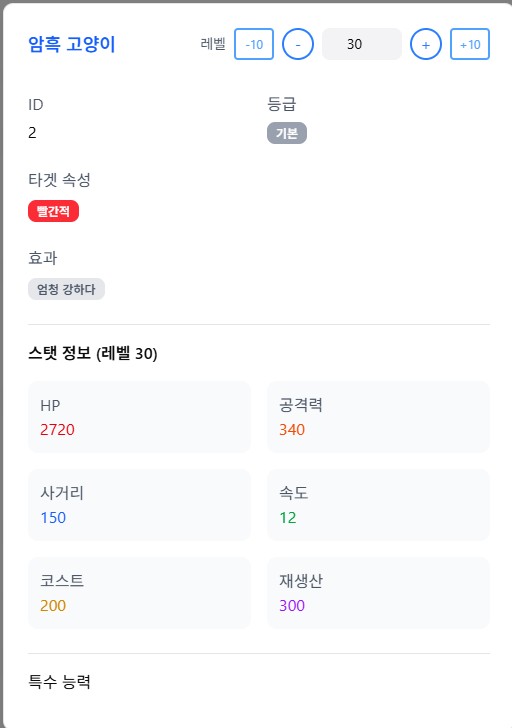
- 레벨에 따른 스탯 계산 기능
- 이름 누르면 해당 유닛의 디테일 페이지로 이동
"use client";

import { useMemo, useCallback } from "react";
import {
  Dialog,
  DialogContent,
  DialogHeader,
  DialogTitle,
} from "@/components/ui/dialog";
import { Input } from "@/components/ui/input";
import { Badge } from "@/components/ui/badge";
import type { Cat as Cat } from "@/types/cat";
import { TARGET_KO, AFFECT_KO, ABILITY_KO, toKo } from "@/lib/translationMaps";
import { getRarityColor, getTargetColor } from "@/lib/colorUtils";
import Link from "next/link";


interface Props {
  isOpen: boolean;
  onOpenChange: (open: boolean) => void;
  selectedCat: Cat | null;
  currentLevel: number;
  setCurrentLevel: (v: number) => void;
}

export default function CatDetailDialog({
  isOpen,
  onOpenChange,
  selectedCat,
  currentLevel,
  setCurrentLevel,
}: Props) {
  if (!selectedCat) return null;

  // 레벨 제한 처리
  const maxLevel = selectedCat.MaxLevel + selectedCat.PlusLevel;
  const validLevel = Math.max(1, Math.min(currentLevel, maxLevel));

  const stats = useMemo(() => {
    const levelData = selectedCat.levelData;
    const baseHp = selectedCat.Hp;
    const baseAtk = selectedCat.Atk;
    const zeroAtk = baseAtk - (levelData[0] / 100) * selectedCat.Atk;
    const zeroHp = baseHp - (levelData[0] / 100) * selectedCat.Hp;

    let remainLevel = validLevel;
    let calculatedHp = zeroHp;
    let calculatedAttack = zeroAtk;
    let index = 0;

    while (remainLevel) {
      if (remainLevel < 10) {
        calculatedAttack += (levelData[index] / 100) * baseAtk * remainLevel;
        calculatedHp += (levelData[index] / 100) * baseHp * remainLevel;
        break;
      }
      calculatedAttack += (levelData[index] / 100) * baseAtk * 10;
      calculatedHp += (levelData[index] / 100) * baseHp * 10;
      index++;
      remainLevel -= 10;
    }

    return {
      calculatedAttack: Math.round(calculatedAttack),
      calculatedHp: Math.round(calculatedHp),
    };
  }, [selectedCat, validLevel]);

  const paddedId = useMemo(() => {
    return selectedCat.Id.toString().padStart(3, "0");
  }, [selectedCat.Id]);

  // 다이얼로그 닫을 때 상태 정리
  const handleOpenChange = useCallback((open: boolean) => {
    onOpenChange(open);
  }, [onOpenChange]);

  // 레벨 변경 핸들러
  const handleLevelChange = useCallback((newLevel: number) => {
    setCurrentLevel(Math.max(1, Math.min(newLevel, maxLevel)));
  }, [maxLevel, setCurrentLevel]);

  // 색상 유틸은 lib/colorUtils에서 제공

  return (
    <Dialog open={isOpen} onOpenChange={handleOpenChange}>
      <DialogContent className="max-w-2xl max-h-[90vh] overflow-y-auto">
        <DialogHeader>
          <div className="flex items-center justify-between">
            {/* Title */}
            <Link href={`/cat/${paddedId}`}>
              <div>
                <DialogTitle className="text-blue-600 cursor-pointer hover:underline">
                  {selectedCat.Name}
                </DialogTitle>
              </div>
            </Link>

            {/* Level Control */}
            <div className="flex items-center gap-2">
              <span className="text-gray-600 text-sm">레벨</span>

              <button
                onClick={() => handleLevelChange(validLevel - 10)}
                className="w-10 h-8 rounded bg-white border-2 border-blue-400 text-blue-400 hover:bg-blue-400 hover:text-white transition-colors text-xs"
              >
                -10
              </button>

              <button
                onClick={() => handleLevelChange(validLevel - 1)}
                className="w-8 h-8 rounded-full border-2 border-blue-500 text-blue-500 hover:bg-blue-500 hover:text-white flex items-center justify-center"
              >
                -
              </button>

              <Input
                type="number"
                min={1}
                max={999}
                value={validLevel}
                onChange={(e) => {
                  const v = parseInt(e.target.value);
                  if (!isNaN(v)) handleLevelChange(v);
                }}
                className="w-20 h-8 text-center"
              />

              <button
                onClick={() => handleLevelChange(validLevel + 1)}
                className="w-8 h-8 rounded-full border-2 border-blue-500 text-blue-500 hover:bg-blue-500 hover:text-white flex items-center justify-center"
              >
                +
              </button>

              <button
                onClick={() => handleLevelChange(validLevel + 10)}
                className="w-10 h-8 rounded bg-white border-2 border-blue-400 text-blue-400 hover:bg-blue-400 hover:text-white transition-colors text-xs"
              >
                +10
              </button>
            </div>
          </div>
        </DialogHeader>

        <div className="space-y-6 mt-4">
          <div className="grid grid-cols-2 gap-4">
            <div>
              <p className="text-gray-600 mb-1">ID</p>
              <p>{selectedCat.Id}</p>
            </div>

            <div>
              <p className="text-gray-600 mb-1">등급</p>
              <Badge className={getRarityColor(selectedCat.Rarity)}>
                {selectedCat.Rarity}
              </Badge>
            </div>
          </div>

          <div>
            <p className="text-gray-600 mb-2">타겟 속성</p>
            <div className="flex flex-wrap gap-2">
              {(Array.isArray(selectedCat.Targets) ? selectedCat.Targets : []).map((t, i) => (
                <Badge key={i} className={getTargetColor(String(t))}>
                  {toKo(TARGET_KO, t as any)}
                </Badge>
              ))}
            </div>
          </div>

          <div>
            <p className="text-gray-600 mb-2">효과</p>
            <div className="flex flex-wrap gap-2">
              {(Array.isArray(selectedCat.Affects) ? selectedCat.Affects : []).map((e, i) => (
                <Badge key={i} className="bg-gray-200 text-gray-600">
                  {toKo(AFFECT_KO, e as any)}
                </Badge>
              ))}
            </div>
          </div>

          <div className="border-t pt-4">
            <h4 className="mb-4">스탯 정보 (레벨 {validLevel})</h4>
            <div className="grid grid-cols-2 gap-4">
              <div className="bg-gray-50 p-3 rounded-lg">
                <p className="text-gray-600">HP</p>
                <p className="text-red-600">{stats.calculatedHp}</p>
              </div>

              <div className="bg-gray-50 p-3 rounded-lg">
                <p className="text-gray-600">공격력</p>
                <p className="text-orange-600">{stats.calculatedAttack}</p>
              </div>

              <div className="bg-gray-50 p-3 rounded-lg">
                <p className="text-gray-600">사거리</p>
                <p className="text-blue-600">{selectedCat.Range}</p>
              </div>

              <div className="bg-gray-50 p-3 rounded-lg">
                <p className="text-gray-600">속도</p>
                <p className="text-green-600">{selectedCat.Speed}</p>
              </div>

              <div className="bg-gray-50 p-3 rounded-lg">
                <p className="text-gray-600">코스트</p>
                <p className="text-yellow-600">{selectedCat.Price}</p>
              </div>

              <div className="bg-gray-50 p-3 rounded-lg">
                <p className="text-gray-600">재생산</p>
                <p className="text-purple-600">{selectedCat.RespawnHalf}</p>
              </div>
            </div>
          </div>

          <div className="border-t pt-4">
            <h4 className="mb-3">특수 능력</h4>
            <div className="flex flex-wrap gap-2">
              {(Array.isArray(selectedCat.Abilities) ? selectedCat.Abilities : []).map((ab, i) => (
                <Badge key={i} variant="outline" className="px-3 py-1">
                  {toKo(ABILITY_KO, ab as any)}
                </Badge>
              ))}
            </div>
          </div>
        </div>
      </DialogContent>
    </Dialog>
  );
}
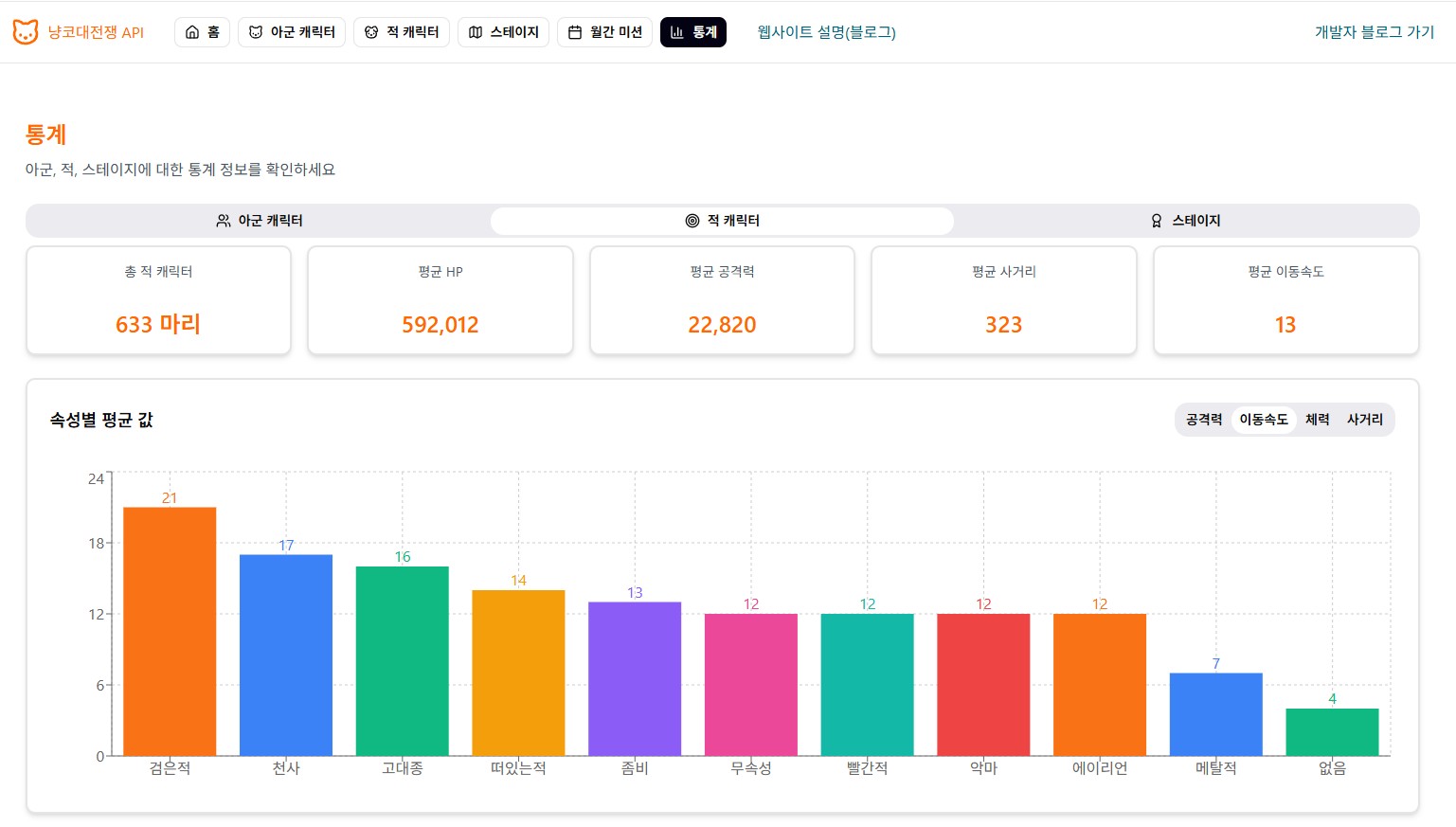
통계 페이지
차트 그냥 대충 만들었습니다
fetch
- 공개된 API가 없어서 딱히 fetch로 가져올 데이터가 없습니다
- 네비바의 우측 상단 개발자 블로그 링크를 fetch로 응답 확인 후 가져오게 했습니다
- 현재 블로그 주소가 tempblog이고 나중에 blog 저장소로 이동 예정이라 blog 주소 확인 후 응답이 404로 오면 tempblog로 링크 걸어둡니다
// lib/getBlogURL.ts
"use client";

import { useEffect, useState } from "react";

async function checkUrl(url: string): Promise<boolean> {
    try {
        const res = await fetch(url, {
            method: "GET",
            next: { revalidate: 60 },
        });
        console.log(res);
        return res.ok; // 200~299
    } catch {
        return false;
    }
}

export function getBlogLink() {
    const [blogUrl, setBlogUrl] = useState<string | null>(null);
    const [loading, setLoading] = useState(true);

    useEffect(() => {
        let cancelled = false;

        async function resolveBlogUrl() {
            // 1순위 Blog
            if (await checkUrl("https://crusthack.github.io/Blog/")) {
                if (!cancelled) setBlogUrl("https://crusthack.github.io/Blog/");
                return;
            }
            // 2순위 임시 블로그
            if (await checkUrl("https://crusthack.github.io/blogtemp/")) {
                if (!cancelled) setBlogUrl("https://crusthack.github.io/blogtemp/");
                return;
            }

            if (!cancelled) setBlogUrl(null);
        }

        resolveBlogUrl().finally(() => {
            if (!cancelled) setLoading(false);
        });

        return () => {
            cancelled = true;
        };
    }, []);

    return { blogUrl, loading };
}// components/Navigation.tsx
<div className="ml-auto flex items-center gap-2">
{loading ? (
<>
<LoadingSpinner />
<span className="text-sm text-gray-400">블로그 확인 중…</span>
</>
) : (
<Link
href={blogUrl!}
target="_blank"
rel="noopener noreferrer"
className="text-cyan-800 hover:opacity-80"
>
개발자 블로그 가기
</Link>
)}
</div>
function LoadingSpinner() {
return (
<div className="w-4 h-4 border-2 border-cyan-600 border-t-transparent rounded-full animate-spin" />
);
}
메타 데이터 추가
// app/layout.tsx
export const metadata: Metadata = {
    icons:{
      icon: "https://i.namu.wiki/i/M6AE8KgdUiL4hPvu8foaiuoQhAg4irefljwcQwO6AMrLqF3N1g-x9fov0mU6Q4wwTeeepQzVT-yw4_qUs_0pfYaxE69UzDs6tbU9riaYER2lvO_nHhxzKNssBW1ZbE7JcZW4SIT4jaup6K8P2kk7hQ.webp"
  },
  title: "냥코대전쟁 DB",
  description: "냥코대전쟁 데이터 조회 사이트",
};// app/cat/[id]/page.tsx
export async function generateMetadata({
params,
}: {
params: Promise<{ id: string }>;
}): Promise<Metadata> {
const { id } = await params;
const cats = await loadCatsById(parseInt(id));
return {
title: cats && cats.length > 0 ? `냥코대전쟁 DB - ${cats[0].Name}` : '냥코대전쟁 DB - 유닛 없음',
description: cats && cats.length > 0 ? `냥코대전쟁 유닛 ${cats[0].Name}의 상세 정보입니다.` : '해당 ID의 유닛을 찾을 수 없습니다.',
};
}